Safer & Faster: AI in an Apple Container
Give your coding agents --dangerously-skip-permissions
without giving them your whole Mac.
12 min read
Available on GitHub
Cyber attacks are hardly hypothetical. Developers have repeatedly become unwitting participants in them: from the XZ backdoor,* discovered almost by accident, to a compromised Axios dependency reaching OpenAI's application-signing infrastructure, and the Mini Shai-Hulud npm attack infecting OpenAI developer machines. My concern with today's AI agents isn't that Claude or Codex will suddenly become Skynet. It's more mundane: we're building an enormous software ecosystem at extraordinary speed — agents, MCP servers, skills, plugins and countless third-party dependencies — without the security scrutiny that more mature software has accumulated over decades.
And we're giving that software remarkable privileges. A coding agent that can edit my source code, run arbitrary shell commands, install packages, connect to development servers and use my credentials is extraordinarily useful — but it's also an unusually attractive attack surface. Tomorrow's useful-but-not-yet-well-audited MCP server worries me considerably more than an AI breakout. So when I started using coding agents seriously, I arrived at a simple principle: I don't want to restrict what the agent can do; I want to restrict what the agent can damage. If I could build a sufficiently strong sandbox around it, I could actually give the agent more autonomy, not less.
Give the Agent Freedom—Inside a Cage
Coding agents are at their best when they're allowed to work autonomously. An agent that has to ask for permission before every file edit, shell command or tool invocation is certainly safer, but much of the productivity gain quickly disappears. And permissions aren't a particularly strong security boundary anyway: after the tenth perfectly reasonable request, how carefully am I really going to scrutinise the eleventh?
My approach was therefore to move the security boundary outwards. Instead of trying to predict which commands are safe, I give the agent considerable freedom inside an environment whose boundaries I control. It can edit files, compile code, install packages, run tests and make mistakes. Inside a deliberately shared project directory, that's a manageable risk: most source-code changes are easy to inspect and revert with Git, while backups provide another recovery path. What it can't do is wander through the rest of my Mac. A deleted project file is likely to be noticed immediately; a deleted or subtly modified file among years of personal documents might go unnoticed until recovery is difficult or impossible. This is exactly the kind of isolation containers are designed to provide, and containerising development environments is already a well-established practice.
The question then became: which container technology should I trust with the cage?
Why Apple Containers Instead of Docker?
Docker was the obvious candidate. It's mature, ubiquitous, has an enormous ecosystem, and is effectively the common language of containers. But on macOS, Docker Desktop runs its Linux containers together inside a Linux virtual machine. Apple Containers takes a different approach: each Linux container runs inside its own lightweight virtual machine, using Apple's Virtualization framework. It still consumes and produces standard OCI container images, so choosing it doesn't mean abandoning the wider container ecosystem.
For my particular use case, that architecture is very attractive. I'm not trying to pack hundreds of cooperating microservices efficiently onto a server; I'm deliberately trying to put an untrusted, highly capable process behind a strong boundary. A VM per agent gives me that additional isolation while Apple has engineered these VMs to start in under a second. The trade-off is maturity: Apple Containers requires Apple Silicon and macOS 26+, and its tooling and ecosystem are nowhere near Docker's. For a general container platform I'd still reach for Docker first. For sandboxing autonomous agents on my Mac, I preferred Apple's architecture.
| Apple Containers | Docker Desktop (macOS) | |
|---|---|---|
| Isolation architecture | Each container runs in its own lightweight VM, designed for sub-second startup | Multiple containers run inside a shared Linux VM |
| Images | OCI-compatible | OCI-compatible |
| Ecosystem | New and relatively small | Huge, industry-standard ecosystem |
| Platform support | Apple Silicon + macOS 26+ | macOS, Windows and Linux |
| Maturity | New | Very mature |
| Best fit here | Strong isolation of individual agents | General-purpose container development |
A sandbox isn't particularly useful for development if the agent can't see the code. When I launch an agent, Container-Agents mounts the current directory into the container, along with everything below it — and nothing above it. If I'm working in ~/Development/my-project, the agent gets my-project, not ~/Development, and certainly not my home directory. From inside the container there simply is no .. that leads back into the rest of my Mac. Combined with Git and backups, this gives the agent a deliberately small and recoverable blast radius.
I also preserve the exact absolute path inside the container. If the project lives at /Users/freire/Development/my-project on my Mac, that's where the agent sees it too. This matters when code contains absolute paths, but becomes particularly useful when launching an agent from an IDE: a filename passed to the agent as an absolute path still points to exactly the right file inside its sandbox. Ideally software shouldn't care that it has been containerised, and in this case it doesn't have to.
There's one important catch: this is only safe if I launch the agent from somewhere I'm prepared to expose. Container-Agents therefore maintains a whitelist of directory trees where agents may run autonomously. Inside those trusted locations I can let Claude Code, Codex, Antigravity, Gemini CLI, Mistral Vibe or OpenCode use their respective don't-ask-me-before-using-tools modes. Elsewhere, those permissions aren't granted. The resulting rule is simple: share the project, not the computer it happens to live on.
The Network is Part of the Sandbox
Files are only half of a development environment. My agents also need to reach services: an LLM or MCP server running on my Mac, a database or web server inside a local virtual machine, or development and production servers elsewhere. Before containerisation, all of these are just hostnames and ports. Put the agent behind another network boundary and suddenly localhost no longer means my Mac — it means the agent's own isolated environment.
Apple Containers makes that isolation particularly explicit. Each container has its own lightweight VM and its own network environment, separate from the host. Apple provides a way through that boundary: container system dns create --localhost can create a hostname inside containers that resolves to the host-side gateway, giving the agent a controlled route back to services on the Mac. A service listening on my Mac can therefore remain reachable without pretending that the container and host share the same network.
But that only solves the first boundary. Much of my development happens against Linux virtual machines running locally through Apple's Virtualization framework. Those VMs live behind another virtual network, independent from the one used by Apple Containers. So the path I actually needed to make work looked more like this:
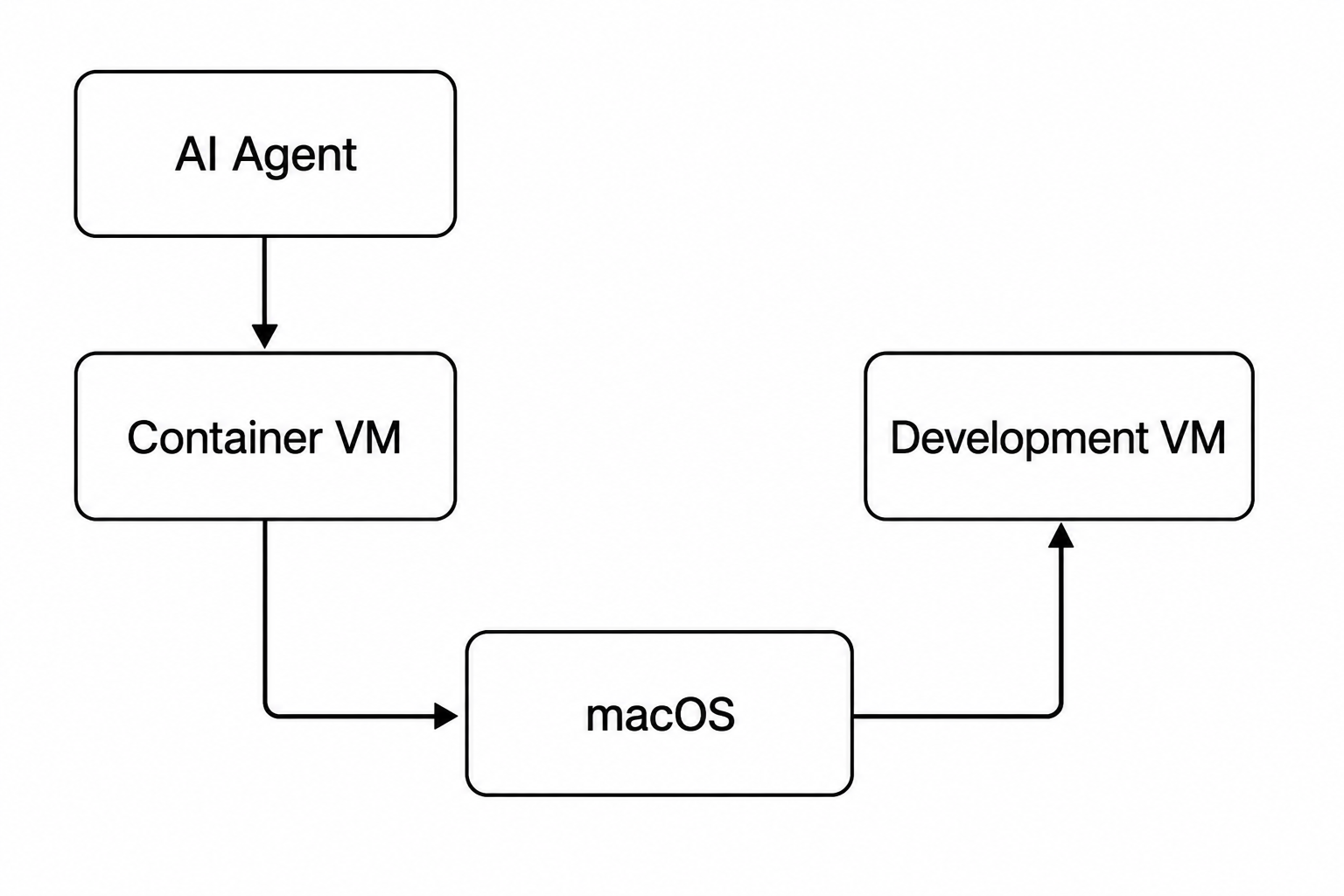
Getting across that second boundary turned out to be considerably more... interesting.
Crossing the Boundaries—localhost and Virtual Machines
The obvious solution would be to make the development VM directly reachable from the container. But that would mean bridging two independently managed virtual networks, with addressing that can change as VMs and containers come and go. I wanted something simpler, predictable and — importantly — narrow in scope. The Mac was already reachable from the container, and the Mac could reach the development VM. I could have tried to join or route the two virtual networks, but that would have increased both the networking complexity and the agent's reachable surface. Instead, I made the Mac a narrow bridge between them.
When I start an agent, Container-Agents establishes SSH local port forwards on macOS for selected services running inside the development VM. Web servers, SSH, databases or other explicitly configured services therefore appear to the container as services on the Mac, using the host-access mechanism described above. The tunnels exist only while they're needed and expose only the ports I've deliberately selected. Instead of weakening the network isolation, I'm punching a handful of small, controlled holes through it.
There's one final compatibility problem: hostnames. My development projects refer to servers by name, not by whatever address a virtual network happens to assign today. Container-Agents therefore passes my Mac's /etc/hosts mappings into the agent environment, rewriting entries for services reached through these tunnels so that they resolve to the container's route to the Mac. The code can continue asking for dev.example.test; underneath, the connection travels Agent → Container VM → macOS → SSH tunnel → Development VM. Once again, the objective is that the software shouldn't need to know it's running inside a sandbox.
SSH Access Without Giving Away the Keys
Local development VMs aren't the end of the story. Sometimes an agent genuinely needs to work on a remote development server — perhaps to inspect logs, restart a service or diagnose something that can't be reproduced locally. Giving the container my normal ~/.ssh directory would solve that immediately, but it would also give the agent every SSH identity and host I've accumulated over the years. Sandboxing the filesystem only to hand the sandbox the keys to everything else would rather defeat the point.
Container-Agents instead gives each agent its own deliberately restricted SSH identity and configuration, mounted read-only inside the container. Claude can only see Claude's key; Codex can only see Codex's. The corresponding SSH configuration determines which hosts and usernames that identity is intended to use, while the servers themselves ultimately enforce what each key is authorised to access. This also gives me something isolation alone cannot: accountability. Remote systems can record agent-specific users or keys in their SSH and audit logs, making actions attributable to a particular agent rather than indistinguishable from my own interactive sessions.
The principle is the same one I've applied throughout the project: don't ask the agent to behave differently — change the environment around it so that the safe path is the easy path.
Safer. Faster.
After all of this — lightweight VMs, restricted mounts, trusted directories, network boundaries, SSH tunnels and separate identities — the part I like most is what hasn't changed. Before Container-Agents, I started my agents with:
cd project
opencode
With Container-Agents, I now start my agents with:
cd project
opencode
The invocation is identical; everything underneath it isn't. From the agent's perspective, it has everything it needs and considerably less of what it doesn't.
And that's ultimately why I built this. Sandboxing sounds like something that should constrain an AI agent, but in practice I've found the opposite: the more confidently I can limit the blast radius, the more freedom I can give the agent inside it. Fewer permission prompts mean less interruption and more autonomous work, while mistakes — or something more malicious — have fewer places to go. I didn't put my agents in containers so they could do less. I put them there so I could safely let them do more.
That's been the real win for me: safer, faster development with AI.